
Capturing Their Personality: How to Photograph Black Dogs & Cats
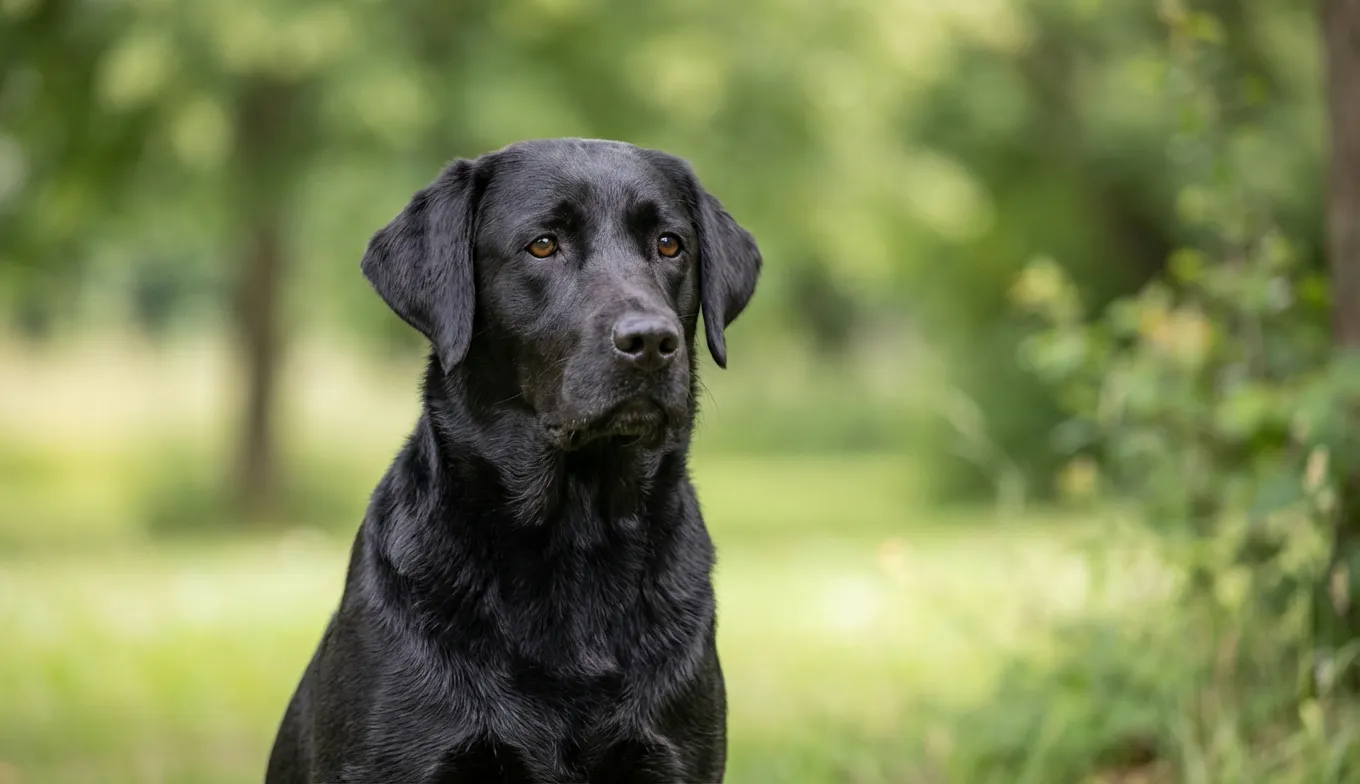
You delete the photo immediately. It’s the third one in a row where your magnificent, glossy-coated Labrador looks like a shapeless void on the living room rug. His eyes—those soulful, amber eyes that communicate entire paragraphs of affection—are gone, swallowed by the shadow of his own fur. In the picture, he isn’t Cooper, the dog who nudges your elbow when you’re sad; he’s a silhouette, a cutout, a black hole in the fabric of your camera roll. It’s frustrating because you know the camera is lying. It isn’t capturing the velvet texture of his ears or the distinct gray hairs now dusting his muzzle. It’s just capturing darkness.
And that’s the unique heartbreak of loving a black pet. You see every nuance of their face, but your phone sees nothing but an absence of light. You want to freeze time, especially as their muzzle starts to gray, but the technology in your pocket seems determined to fail you.
Quick Takeaways:
- Forget "Golden Hour": For black pets, overcast days act as a giant softbox, preventing the harsh contrast that turns fur into a black blob.
- The "Catchlight" Rule: If you can’t see the reflection of the sky or a window in their eyes, the photo will feel lifeless. No exceptions.
- Exposure Compensation is Key: Your camera’s automatic meter wants to turn black fur gray; you need to manually underexpose slightly to keep rich blacks, then lift shadows in editing.
- Background Matters More: A black dog against a dark couch is invisible. Use colored blankets or lighter walls to create separation.
- Texture is Everything: Light needs to skim across the fur (side lighting), not hit it head-on, to reveal the individual hairs and definition.
The Physics of the "Black Blob" (And Why Your Phone is Confused)
Most guides will tell you to just "add more light." That is terrible advice. If you blast a black cat with direct sunlight or a flash, you don't get a better photo—you get a washed-out gray animal with demonic glowing eyes.
Here is the technical reality most people miss: cameras are designed to see the world in "middle gray" (specifically, 18% gray). When you point your lens at a black dog, the camera’s light meter panics. It thinks, "Wow, it's dark in here," and tries to brighten the image until that beautiful obsidian fur looks like dusty charcoal. The result is a noisy, grainy photo where the background is blown out and the dog looks dull.
We learned this the hard way at PawSculpt. When customers send us reference photos for their custom figurines, the number one issue we face isn't blurry photos—it's photos where the pet’s facial structure has been flattened by the camera's inability to process deep black. We need to see the brow ridge, the cheekbones, the specific way the lip curls.
The Fix: Negative Exposure Compensation.
On your phone, tap the screen to focus on your pet’s face. A little sun icon usually appears. Drag that sun down. It feels counterintuitive to darken the image, but you are telling the camera, "Yes, this object is supposed to be black." This preserves the richness of the coat. You can always brighten the shadows later, but you can never fix a photo where the black has been digitally bleached into gray noise.
The Secret Weapon: The "Giant Softbox" Theory
Imagine a cloudy Tuesday afternoon. The sky is a flat sheet of white-gray. Most photographers stay inside. You should run outside.
Direct sunlight creates hard shadows. On a golden retriever, hard shadows add depth. On a black Bombay cat, hard shadows merge with the black fur, effectively erasing parts of the animal's body. The shadow of the nose blends into the cheek, and suddenly your cat looks 2D.
Overcast skies diffuse sunlight through the clouds, scattering it so it hits your pet from every angle simultaneously. This is nature’s softbox.
A client sent us a photo recently of her Flat-Coated Retriever, Barnaby. The first batch was taken at noon on a sunny beach. He looked like a shadow puppet. The second batch was taken on a drizzly morning on the porch. The difference was staggering. In the soft, diffuse light, you could see the crimp in his ear fur, the wetness of his nose, and the deep brown undertones in his coat that only appear in specific lighting.
If you must shoot indoors:
Never point the light at the pet. Bounce it. If you have a flash, point it at a white ceiling or a white wall opposite the pet. The light will hit the wall, spread out, and fall gently back onto the black fur, revealing texture without creating harsh hotspots. If you're using window light, hang a sheer white curtain. That $10 piece of fabric is the difference between a professional portrait and a snapshot.
The Eyes Have It: Creating the "Spark of Life"
There is an old superstition that black cats are bad luck or "spooky." We’re convinced this myth persists simply because people can't see their eyes in photos. Without visible eyes, a predator looks unreadable, even threatening. When you can see the pupil and the iris, the connection is restored.
For black pets, the "catchlight" is non-negotiable. This is the tiny white reflection of the light source in the eye.
Without a catchlight, a black dog’s face is a void. With it, they look sentient and present.
- The Window Trick: Position yourself with your back to a large window. Have your pet face you (and the window). The sky will reflect in the upper curve of their eye.
- The Treat Lure: Hold a high-value treat right above your camera lens. This forces their chin up and opens their eyes wider, catching more ambient light.
- The White Paper Hack: If the eyes still look dead, place a large sheet of white poster board or a white towel on the floor in front of them (out of the frame). The sunlight hitting the white surface will bounce up into their eyes, creating a bottom catchlight that separates the dark iris from the dark eyelid.
We once modeled a figurine for a black pug named Otis. His owner sent twenty photos, all taken from standing height looking down. Because of his brow ridge and the downward angle, his eyes were in total shadow. We had to ask for a "reshoot." We told her: "Get on your belly. Get lower than Otis." Once she dropped to his eye level, the ceiling lights reflected in his eyes, and suddenly, his goofy, demanding personality was visible.
Background Control: The Contrast Trap
This is where artistic choice meets technical necessity. You might love your navy blue velvet sofa. Your black cat, however, will disappear into it like a chameleon.
The camera relies on contrast to find focus edges. If the edge of your dog’s ear is black, and the wall behind it is dark wood, the autofocus will hunt back and forth, failing to lock on. The resulting image will be soft-focus, further obscuring the details.
The "Pop" Palette:
- Jewel Tones: Emerald greens, royal purples, and deep reds look incredibly luxurious behind black fur. Think of a black Lab in a field of green clover. The green reflects slightly onto the black fur, giving it definition.
- Warm Neutrals: Cream, beige, or light terracotta. These colors warm up the image without competing.
Avoid Pure White: A black dog on a pure white background (like snow or a seamless backdrop) creates too much dynamic range for most phone cameras. The camera will expose for the white snow, turning the dog into a silhouette again. If shooting in snow, overexpose the image significantly (tap and drag the sun icon up* this time) to ensure the fur has detail, even if the snow blows out to pure white.
Texture vs. Color:
Sometimes the background color isn't the problem—it's the complexity. A black dog in a messy room full of cords and shadows is visual chaos. The eye doesn't know where to look. We always suggest decluttering the space behind the pet. A clean background makes the subject pop. When we create custom figurines, we often have to mentally "delete" the background clutter from reference photos to understand the pet's true silhouette. It’s much easier if you do that work in the camera first.
The Angle of Incidence: Why Side Lighting Wins
If you shine a flashlight directly at a brick wall, the wall looks flat. If you shine the flashlight from the side, skimming the surface, every bump and groove of the brick casts a tiny shadow, revealing the texture.
Fur works the same way.
Direct, frontal lighting flattens black fur into a mat. Side lighting (raking light) highlights the tips of the hairs while leaving the roots in shadow. This creates a 3D effect that makes the fur look touchable.
The Setup:
Position your pet so the main light source (window or sun) is hitting them at a 45 to 90-degree angle.
- Bad: Sun directly behind you (flat light).
- Bad: Sun directly behind the dog (silhouette).
- Good: Sun to your left or right.
Watch specifically for the "rim light." This is the holy grail of black dog photography. If you can position the dog so the sun is slightly behind them but off to the side, the light will catch the very edge of their silhouette, outlining them in a halo of gold or white. This separates them from the background perfectly. It requires patience—you might have to move yourself and the dog five or six times—but when you catch that rim light on a black German Shepherd’s ears, it looks angelic.
Action Shots: The Blur Problem
Black pets are notoriously difficult to photograph in motion. Because they are dark, the camera needs to keep the shutter open longer to let in enough light. But if the shutter is open longer and the dog moves, you get motion blur. A blurry brown dog looks like a dog; a blurry black dog looks like a smudge on the lens.
The "Sport Mode" Solution:
Even if your dog is just walking, use "Sport Mode" or "Burst Mode" on your camera. This forces a faster shutter speed.
- The Trade-off: A faster shutter lets in less light. This means your photos will be darker.
- The Fix: Accept the grain. It is better to have a sharp, grainy photo of your dog catching a frisbee than a smooth, blurry one. You can fix noise in editing apps like Lightroom; you cannot fix blur.
We recently worked with a client memorializing her border collie mix, Luna. Luna was fast—a blur of black and white energy. The owner had thousands of photos, but in 90% of them, Luna was a streak. The photos that truly captured her spirit, the ones we used to sculpt her musculature and alert stance, were the ones taken in burst mode outside on a bright day. They weren't technically perfect, but they were sharp.
Post-Processing: Where the Magic Happens
You’ve taken the shot. It looks okay, but maybe a little flat. Do not slap an Instagram filter on it. Most preset filters increase contrast, which crushes the blacks—exactly what you are trying to avoid.
You need to edit manually. It takes 30 seconds.
- Shadows: Crank this UP. Slide it to +30 or even +50. This digs into the dark areas and recovers the detail of the fur.
- Blacks: Slide this DOWN slightly. Wait, didn't we just lift shadows? Yes. Lifting shadows reveals detail, but it can make the black fur look gray and washed out. Sliding the "Blacks" slider down re-anchors the deepest tones, ensuring the dog still looks black, not dusty.
- Texture/Structure: Increase slightly (+10). This sharpens the individual hairs.
- White Balance: Black fur often reflects the blue of the sky (making the dog look cool blue) or the orange of indoor lights (making them look muddy brown). Adjust the temperature until the black looks neutral—like rich dark chocolate or coal.
The "Cast" Check:
Look closely at the fur in your photo. Does it look purple? Green? Black fur is highly reflective. If your dog is sitting on a red rug, their chin will look red. Use the "Tint" slider to correct this, or use a "brush" tool in apps like Snapseed to desaturate just the weird color cast on the fur without removing the color from the rest of the image.
Capturing the Gray: The Aging Black Dog
There is a specific poignancy to the muzzle of an aging black dog. The "sugar face," as we call it. It starts as a few stray hairs on the chin, then spreads like frost across a windowpane, encircling the eyes and dusting the paws.
Many owners try to hide the gray in photos, looking for angles or lighting that minimize it. We urge you: don't.
That gray is the map of their life with you. It marks the years of balls fetched, the nights spent guarding the foot of your bed, the worry they carried when you were sick. Photographing the contrast between the deep black coat and the brilliant white muzzle is visually stunning and emotionally heavy.
How to highlight the "Sugar":
Use soft, directional window light. Convert the photo to black and white.
Black and white photography was made for black dogs with gray muzzles. Without the distraction of color—the brown floor, the blue leash—the image becomes purely about texture and contrast. The white hairs shine like silver wire against the dark fur.
When we paint the figurines of senior dogs at PawSculpt, getting that gradient of gray right is the most delicate part of the process. It’s not just white paint on black; it’s a dry-brushing technique that mimics the way aging fur thins and changes texture. A high-contrast black and white photo helps us—and you—see the dignity in that aging process.
The "Invisible" Moments
The hardest photos to take aren't the posed portraits; they are the candid moments where a black pet tends to disappear. Sleeping in a dark dog bed. Cuddled up against your black leggings.
To capture these, you have to stop trying to photograph the dog and start photographing the shape.
Look for the silhouette against a lighter element. If they are sleeping on your legs, pull the blanket back so their head rests on the white sheet. If they are in a dark bed, throw a light-colored toy next to them to give the camera a reference point for focus.
There is a distinct panic that happens when you lose a black pet in the dark—that moment in the backyard at night when you call their name and strain your eyes against the shadows. Capturing them in low light feels like conquering that fear. It’s proof of their presence.
The Gear Myth (You Don’t Need a $3,000 Camera)
A client once told us, "I'm waiting to buy a DSLR before I take good pictures of Midnight." By the time she bought the camera, Midnight had developed cataracts that clouded his eyes.
The best camera is the one you have in your hand right now. Modern smartphones (iPhone 13/14/15, Pixel 7/8, Samsung S23/24) have incredible "Night Modes" and computational photography that can actually outperform DSLRs in the hands of a novice.
Phone-Specific Tips:
- iPhone: Use "Portrait Mode" but change the lighting effect to "Studio Light" (the second circle). This brightens the face without blowing out the background.
- Samsung: Use "Pro Mode." It allows you to manually adjust the ISO. Keep ISO low (under 800) to prevent the black fur from looking grainy.
- Google Pixel: The "Unblur" feature is a miracle for black cats who refuse to sit still.
Don’t wait for the perfect gear. The "perfect" photo isn't the one with the highest pixel count; it's the one that captures the way your cat’s tail hooks at the end, or the way your dog’s ear flips inside out when he’s listening to a squirrel.
A Note on Memory
We live in a visual culture. We document our lattes, our vacations, our outfits. But often, we fail to truly document the creatures who live in the margins of our days. Black pets, because they are "hard to photograph," often end up with fewer high-quality photos than their lighter-colored counterparts.
Make the effort. Wrestle with the lighting. Lie on the wet grass. Adjust the exposure sliders until your thumb hurts.
Because one day, the house will be quiet. The spot on the rug will just be a spot on the rug, not a warm, breathing void. You will scroll back through your phone, past the screenshots and the memes, looking for them. And when you find that photo—the one where the side-lighting catches the velvet texture of their ear, where the catchlight reveals the universe in their eye, where the exposure is just right so they look like them—it will feel like a visitation.
It won't just be a picture of a black dog. It will be the feeling of their weight leaning against your leg, preserved in light and shadow.
Frequently Asked Questions
Why do my black dog's eyes look green/blue in photos?
This is caused by the tapetum lucidum, a reflective layer behind the retina that helps animals see in the dark. When your camera flash hits it, the light bounces back, creating that ghostly glow. The Fix: Turn off the flash. Always. Use natural light or a continuous light source (like a lamp) positioned to the side of the animal, not directly in line with the lens.How do I photograph a black dog and a white dog together?
This is the "dynamic range" nightmare. If you expose for the black dog, the white dog becomes a glowing orb. If you expose for the white dog, the black dog becomes a silhouette. The Fix: Shoot in "HDR" (High Dynamic Range) mode if your phone has it. Better yet, place the black dog closer to the light source than the white dog. If the black dog is in the sun and the white dog is in the shade, the exposure will balance out naturally.My black cat looks like a blob of fur. How do I show features?
You need "rim lighting." Position the cat so a window or lamp is slightly behind them and to the side. This creates a halo of light along the edges of their fur, separating their head from their body and their body from the background. Also, try photographing them against a light-colored blanket.What is the best background color for black pets?
Avoid black, dark brown, or navy blue. The best backgrounds provide contrast without being blindingly bright. Think sage green, mustard yellow, terracotta, or light gray. Nature provides great backdrops: green grass, autumn leaves, or a sandy beach all work beautifully.Can I fix a photo where my dog is too dark?
Yes, to an extent. Use a photo editing app (Lightroom Mobile or Snapseed are great). Lift the "Shadows" slider significantly, but then lower the "Blacks" slider slightly to prevent the fur from looking gray. Increase "Texture" or "Structure" to define the hair. If the photo is extremely dark, however, the digital information might not be there to recover.At PawSculpt, we know that every pet is a masterpiece of personality. Whether you have thousands of photos or just a few precious snapshots, we specialize in turning those 2D memories into tangible, lifelike art. Discover how we capture the spirit of your pet here.
Celebrate Your Pet's Unique Personality
Every pet has quirks and characteristics that make them one-of-a-kind. A custom PawSculpt figurine captures those details—the way they tilt their head, their favorite pose, the spark in their eyes.
Free instant AI preview • 3D artist preview within 7 days • 5 free revisions